Showing posts with label facebook. Show all posts

Monday, October 29, 2012

Check the Facts Before You Forward Those Photos

Back in March I wrote a post about a picture supposedly taken of a tornado in Georgia.  The photo was being passed around Facebook, and it was an awesome photo.  However, it was not of a tornado in Georgia the previous evening.  It was a very cool phenomenon caused by an erupting volcano.

Today I saw this photo on Facebook:

This is supposedly Hurricane Sandy bearing down on New York City and Liberty Island.
Well, guess what?  Yep, you guessed it - it's NOT Hurricane Sandy.  It's not even a 'real' picture - it's a Photoshop image combining a photo of  the Statue of Liberty and another photo of a  supercell thunderstorm from 2004.  It looks really cool, but it's not the real thing.

I haven't seen all the others floating around, but here's a list of 11 Viral Photos That AREN'T Hurricane Sandy.  What can we learn from this?  What should we have already learned regarding practically everything that we find on the internet, and that definitely includes Facebook?  Check the facts before you forward or share those photos.  Or emails.  Or anything else.

Maybe you think it doesn't really matter, but it's so easy for something to take on a life of its own.  If you don't believe me, be sure to check out this explanation of How a Fake Photo Goes Viral.

Thursday, May 3, 2012

What Were You Doing Last Year?

Timehop
Timehop (Photo credit: dklimke)
If you're like me, you don't know.  Hey, sometimes I can't even remember what I did last week.  Or yesterday.  Or earlier this morning...

OK, maybe it's not that bad, but sometimes I do have to stop and really think about it, and I definitely do not remember what I was doing last year.  So, I just signed up for Timehop.  It's a FREE service that searches your Facebook status, Twitter updates, and other online services and sends a daily email letting you know what you were talking about and doing a year ago. 

Timehop turns your web services into a time capsule. Everything you post today becomes a note for the future!
Sounds like fun, doesn't it?  
Enhanced by Zemanta

Tuesday, April 17, 2012

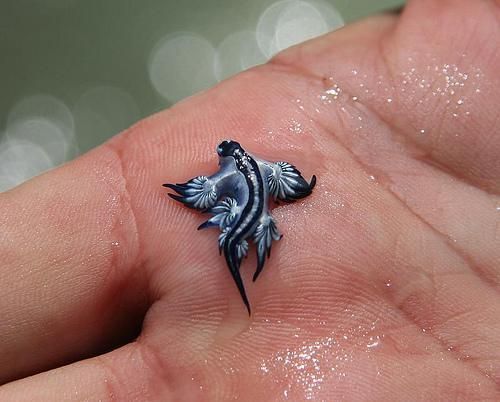
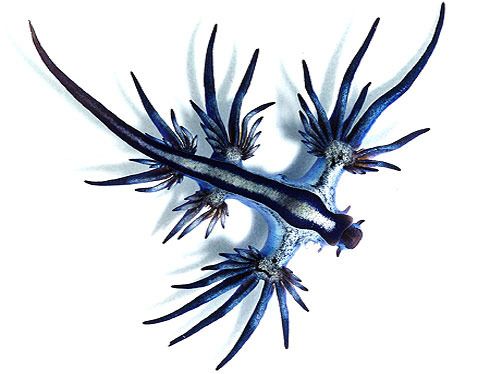
It Looks Like a Baby Dragon!

I just saw this picture on Facebook.  The description says that it's a Glaucus Atlanticus sea slug, but it looks like a baby dragon - or some kind of fake.  Doesn't it?


So I looked up Glaucus Atlanticus sea slug - and it's real. There is lots of info out there on this little slug, also known as sea swallow, blue glaucus, blue sea slug and blue ocean slug.  Found off of South Africa, Mozambique or Australia, this little creature floats upside down riding the surface tension of the water.  It feeds on Portuguese man o’ wars, consuming the toxic nematocyst cells that the man o’ war uses to immobilize fish.

The slug is immune to the toxins and collects them in special sacs within the cerata—the finger-like branches at the end of its appendages—to deploy later on.  So, while these creatures may be tiny and incredible-looking, they can pack a powerful sting! 

Look, but don't touch - and marvel at the amazing creatures in our world!

Saturday, March 3, 2012

Not a Doctored Photo?

I saw this photo on Facebook tonight.
The caption read: "Taken in Rome, GA last night... I got this off fox fives website go look...to me that doesn't look like a tornado, more like Hell..."
and my friend shared it with the comment, "Not a doctored up photo. Have you ever seen such a sight in your LIFE!!!"

Not one to believe everything I read, I went searching for Fox Five in Georgia, and I did find this photo on their site.  But when I clicked on it, I found a comment that said it was an old photo, not of a tornado from last night's storms, but of a volcano erupting.  The commenter said that he had used the same picture in a video more than a year ago.  I don't know if this is the video he was referring to, but I did find a video that uses this photo, and it was posted in November.

So, maybe it's not a doctored photo - except that it was cropped - but it's also not a photo of a tornado in Georgia last night.

Still a very cool photo! And did you know that volcanic eruptions are accompanied by lightning?  I didn't.  Then again, I've never seen a volcano erupt.  I did, however, watch this video while I was on YouTube:


How cool is that?

As I was writing this post, I went back to the Fox Five news website, and I could no longer find the photo - so it looks like it's been removed.  There are enough photos of the weather and storm damage.  Why someone felt the need to post this particular photo and claim that it's something it's not is beyond me.

Enhanced by Zemanta

Sunday, December 4, 2011

Facebook Tags - Now More Fun

A friend of mine posted this on facebook today, so I just had to try it.  I love being able to tag my facebook friends in status updates and comments.  It's a great way to call their attention to something.  I also love that we no longer have to use their full names when we tag them - because that's just not natural sometimes - most of the time, actually.

And now, thanks to a bit of extra code, we can tag our friends using any words at all!  It won't be something you'll do every day, but once in a while, just for fun - why not?

Here are the basic steps:
  • Copy and past this code into your status update or comment - @@[0:[NUMBER-ID:0:TEXT]]
     
  • Find the Numerical ID for the person you want to tag.  For some friends it will be at the end of the url on their profile page -  http://www.facebook.com/profile.php?id=100000496127817  Copy that number.
     
  • If your friend has a custom url, like me, with a username at the end instead of a number - www.facebook.com/anna.hagen - all you have to do is replace the 'www' with 'graph' - graph.facebook.com/anna.hagen - When you load that page, the id number will be at the top.  Copy that number.
     
  • Paste the User ID into the code - replace the part that says 'NUMBER-ID' - @@[0:[100000496127817:0:TEXT]]
     
  • Decide how you want to tag your friend.  Replace the word 'TEXT' with the words you want to use.  For instance, this is for my husband - @@[0:[100000496127817:0:my favorite husband ever]]

  • Compose your message around the code - Sitting here watching TV with @@[0:[100000496127817:0:my favorite husband ever]]. Aren't we exciting?
     
  • Post your status update!


Have fun with it!

For better directions with pictures, check out this post.   It says it's a post for tagging photos, but they really mean status updates and comments.  I'm not sure if it's possible to do this with photos or not.  I know you can tag anyone/anything in photos using whatever words you want, but I don't know if it's possible to make them links.   Anybody know?

Friday, July 1, 2011

Stop Forwarding that Crap

A friend of mine posted this on facebook, and it is so good.  I just had to share.

Music video by "Weird Al" Yankovic performing Stop Forwarding That Crap To Me:


If you have any more questions, please see How to Forward E-mail Appropriately.  Your friends will thank you.

Saturday, May 7, 2011

No Facebook? You Could be Missing Out

My son missed my last post on this blog where I mentioned my new toy.  He's a busy college student, and even though he spends plenty of time online, he doesn't have time to keep up with everything I post.  Or so he says.  He's busy with the last week of classes, a theater banquet, and audition, and studying for finals.  I guess I can excuse him.

He called this afternoon to ask me what my new toy is - not because he'd seen the post, or he would have known, but because he'd seen some references to it on Facebook.  One of my friends was checking it out and sent him a message, and then I updated my status, "Playing with my new toy. These touch screens are touchy." Underneath it said 'via Android' so he just had to ask. 

The point is, sometimes you might need brochure printing to get the word out about something, but for lots of things Facebook is a great way to let people know what's going on.  It's quick and easy to update, and you don't have to send out individual emails or messages.  When you post a status update, link, photo, or whatever, all your friends can see it.  If it's something they're interested in, they can check it out.  If they're not interested, they can just skip on to the next item in the newsfeed.  It's one of the quickest ways to keep up with a lot of people at once.  And it's not just for busy college students.  There are people of all ages on facebook.  I love it for keeping up with family and friends.  Letters, phone calls, emails - all still have their place, but for day-to-day interaction, Facebook is great.

Businesses are also on Facebook - websites, stores, brands - and it's a good way to connect with their customers and get new ones.  It's a great way to promote new products and by giving away free products, trials, or savings, to get their fans to spread the word.  Sure, there will still be a place for the traditional things like coupons in the Sunday paper, magazine ads, and brochures to pick up in the store, but the smartest businesses are expanding into social networking, using Facebook and Twitter to grow their audience.

If you're not on Facebook, you could be missing out.  Missing out on things your friends are doing or thinking, things that aren't 'important' enough for a phone call or an email, but things you might enjoy hearing about.  Missing out on special sales and free items from brands you love or learning about new products...

Of course, you could also be missing out on wasting a bunch of time, but we'll just forget about that for now...

Tuesday, March 22, 2011

Where Are My Links?

I've been sharing links on Facebook, mainly because it's easy.  I see something I like, and I share the link.  And I used to be able to go back and find those links - because I wasn't just sharing them, I was saving them for later.  Except, I can't find them anymore!  I checked Facebook's help page and found this:
Where are my links?

You can access your links from your homepage:
  1. Go to the left-hand navigation column, and look for the section that lists your applications.
  2. Click on "More" to see the full list.
  3. Find and select the "Links" filter.
  4. At the top of the page, select "My Links."
The only problem is that I don't see any "Links" filter and can't select "My Links" after that.  They must be there somewhere, but for now it looks like all my links are missing.  So, facebook help was not much help.  If any of you know how I can find the links I've posted to facebook, please let me know!

But from now on, when I come across a recipe I want to try, a game I want to play, or a great source for postcards, I'm going to have to save it to my recipe blog or share it here, instead of relying on facebook - which is what I should have been doing all along.  Then, I'll be able to find them later.