Pinterest. It can be so addictive. Once you start looking at all the great stuff pinned by others, it's just so easy to repin, repin, repin.
I see a lot of pins with the words 'pin now, read later' - good idea, right? Just pin the stuff that looks interesting; you can always get back to it and really check it out later. All you have to do is mouse over any interesting photo or pin that catches your eye, click the 'repin' button, and select a board to pin it too, and you're on to the next one.
I admit, I've done that a time or two. The problem with that, though, is that so many other people are doing the same thing. It's OK if the original pinner pinned the actual source of the article or recipe or tutorial or what have you. But it doesn't always work that way.
Too often I find pins that just don't lead anywhere. I click something that looks interesting, and I get a warning about a suspicious site - and I'm not going there, even if Pinterest actually gave me the option. And that means I do not find the recipe or tutorial I was looking for. (If it looks really good, I'll do a web search for whatever the pin was supposed to take me to, and I'll pin that.)
Sometimes pins lead to the original site, but not to the exact post or recipe - meaning I have to search through the whole list or blog to find the information I came for. For instance, I was just searching for flank steak recipes and found one for tacos that look really good. Clicking the pin led me to a page with all the posts on that blog that were labelled 'Mexican' - so I had to scroll through the whole list of posts to find the one I wanted. And then I pinned it. Instead of repinning. MY pin leads directly to the specific post with the taco recipe. I'll be able to find the recipe later when I want it.
Everyone who just repinned the recipe without actually clicking through and looking at it? When later finally comes, and they're ready to try the recipe (or read the cleaning tips, or follow the tutorial), they'll click, expecting to find whatever it was they pinned. Instead, in this case, they'll get the whole list of 'Mexican' labelled posts. If it's much later at all, that list could be significantly longer, making it even harder to find the recipe.
Another thing I've found, especially with recipes (but that may be just because I pin more recipes than anything else), are pins that lead to a post that links to the actual source of the recipe. In that case, I visit the original source and pin that one. One, because I don't want to have to click and then click again to get where I want to go, and Two, credit, linkage, and traffic should go to the original source and not just someone who linked to the original source.
So, while it's tempting to 'pin now, read later' I make a habit of checking the pins before I repin them. That way, when later finally comes, I'll be able to read.
Showing posts with label photos. Show all posts
Showing posts with label photos. Show all posts
Thursday, January 31, 2013


Monday, October 29, 2012
Check the Facts Before You Forward Those Photos
Back in March I wrote a post about a picture supposedly taken of a tornado in Georgia. The photo was being passed around Facebook, and it was an awesome photo. However, it was not of a tornado in Georgia the previous evening. It was a very cool phenomenon caused by an erupting volcano.
Today I saw this photo on Facebook:
Well, guess what? Yep, you guessed it - it's NOT Hurricane Sandy. It's not even a 'real' picture - it's a Photoshop image combining a photo of the Statue of Liberty and another photo of a supercell thunderstorm from 2004. It looks really cool, but it's not the real thing.
I haven't seen all the others floating around, but here's a list of 11 Viral Photos That AREN'T Hurricane Sandy. What can we learn from this? What should we have already learned regarding practically everything that we find on the internet, and that definitely includes Facebook? Check the facts before you forward or share those photos. Or emails. Or anything else.
Maybe you think it doesn't really matter, but it's so easy for something to take on a life of its own. If you don't believe me, be sure to check out this explanation of How a Fake Photo Goes Viral.
Today I saw this photo on Facebook:
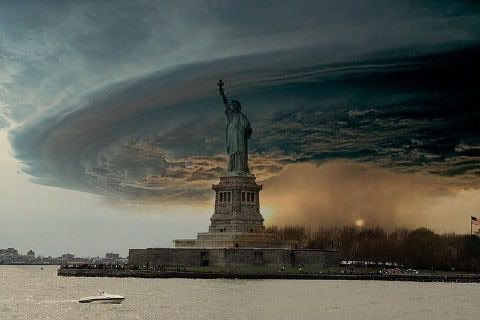 | ||
| This is supposedly Hurricane Sandy bearing down on New York City and Liberty Island. |
I haven't seen all the others floating around, but here's a list of 11 Viral Photos That AREN'T Hurricane Sandy. What can we learn from this? What should we have already learned regarding practically everything that we find on the internet, and that definitely includes Facebook? Check the facts before you forward or share those photos. Or emails. Or anything else.
Maybe you think it doesn't really matter, but it's so easy for something to take on a life of its own. If you don't believe me, be sure to check out this explanation of How a Fake Photo Goes Viral.
Wednesday, May 30, 2012
Save Your Tabblos Today
I haven't really used it in a while, but tabblo was a lot of fun. It was a great site that allowed users to upload photos and arrange them into artful and interesting pages. There is quite a community of users, and people have put together some amazing things!
Thankfully one of my tabblo contacts shared her final tabblo yesterday, and when I visited I found the following notice:
We regret to inform you the Tabblo service and website will not be available after May 30, 2012. Please visit HP.com to explore other HP products and services.
Thank you.That's today!
So I've been busy saving all my tabblos. I may not have used the site in a while, but I've got several that I'd hate to lose - whether I ever do anything with them or not. If you've got some you'd like to save - even if you haven't been there or done anything with them in a while, do it today.
The process is simple - view your tabblos, and next to the thumbnails of each tabblo you'll see several options. Select 'print' - this opens the tabblo as a PDF in Adobe Reader. It will also open your printer dialog, but just hit cancel, unless you want an actual printed copy. Look over the PDF to be sure all your photos loaded - what you see is what you'll have, so if they don't load the first time, close your PDF and try again. I had to load a few of mine 2 or 3 times. Once you get the whole thing, choose 'Save a Copy' from the file menu in Adobe Reader and choose where to save it. Repeat for each tabblo you want to save.
My way only saves a PDF version. I just found this Tabblo Lifeboat Downloader which sounds like it saves them in the same format as they appear on the site, which might be nice. Maybe I'll do that too....
Whatever you do - save them today if you're going to do it, because they won't be available tomorrow.
Thankfully one of my tabblo contacts shared her final tabblo yesterday, and when I visited I found the following notice:
NOTICE:
Dear Tabblo Users,We regret to inform you the Tabblo service and website will not be available after May 30, 2012. Please visit HP.com to explore other HP products and services.
Thank you.
So I've been busy saving all my tabblos. I may not have used the site in a while, but I've got several that I'd hate to lose - whether I ever do anything with them or not. If you've got some you'd like to save - even if you haven't been there or done anything with them in a while, do it today.
The process is simple - view your tabblos, and next to the thumbnails of each tabblo you'll see several options. Select 'print' - this opens the tabblo as a PDF in Adobe Reader. It will also open your printer dialog, but just hit cancel, unless you want an actual printed copy. Look over the PDF to be sure all your photos loaded - what you see is what you'll have, so if they don't load the first time, close your PDF and try again. I had to load a few of mine 2 or 3 times. Once you get the whole thing, choose 'Save a Copy' from the file menu in Adobe Reader and choose where to save it. Repeat for each tabblo you want to save.
My way only saves a PDF version. I just found this Tabblo Lifeboat Downloader which sounds like it saves them in the same format as they appear on the site, which might be nice. Maybe I'll do that too....
Whatever you do - save them today if you're going to do it, because they won't be available tomorrow.
Tuesday, April 17, 2012
It Looks Like a Baby Dragon!
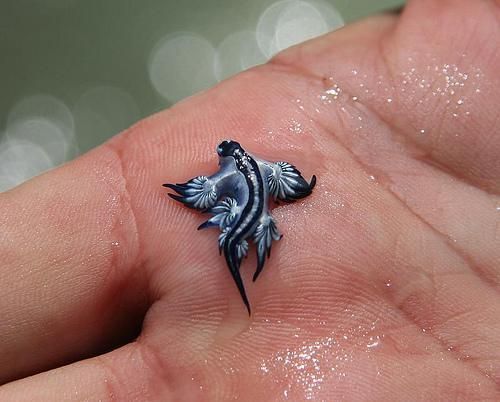
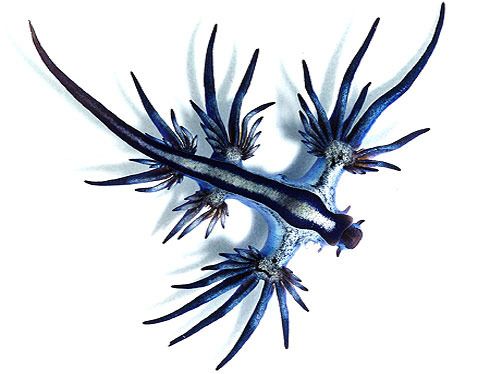
I just saw this picture on Facebook. The description says that it's a Glaucus Atlanticus sea slug, but it looks like a baby dragon - or some kind of fake. Doesn't it?

 So I looked up Glaucus Atlanticus sea slug - and it's real. There is lots of info out there on this little slug, also known as sea swallow, blue glaucus, blue sea slug and blue ocean slug. Found off of South Africa, Mozambique or Australia, this little creature floats upside down riding the surface tension of the water. It feeds on Portuguese man o’ wars, consuming the toxic nematocyst cells that the man o’ war uses to immobilize fish.
The slug is immune to the toxins and collects them in special sacs within the cerata—the finger-like branches at the end of its appendages—to deploy later on. So, while these creatures may be tiny and incredible-looking, they can pack a powerful sting!
Look, but don't touch - and marvel at the amazing creatures in our world!
The slug is immune to the toxins and collects them in special sacs within the cerata—the finger-like branches at the end of its appendages—to deploy later on. So, while these creatures may be tiny and incredible-looking, they can pack a powerful sting!
Look, but don't touch - and marvel at the amazing creatures in our world!
Wednesday, March 21, 2012
Add Photos from Your Phone
Lately I've noticed that Blogger gives the option to add a photo from your phone, so I thought I'd test it to see how it works.
Well, never mind. It's part of the Google+ for Android app - which I would get, but my phone is stupid and doesn't have room for any more apps. In fact, it tells me every day that I'm low on space, and the apps that I do have need updated - but there's not enough space to update them. I am seriously going to need to get a new phone soon! I don't even have very many apps. The phone just barely has enough internal space for the apps that came on it - the ones I can't delete or move to the SD card. It's frustrating.
If I could actually add the app, not only would it be handy to be able to use my phone pics for blogging, but all my pics would automatically be added to Google+ (in a private folder) - so I'd never lose any pictures - no matter what, which would be great.
 Who has Google+ for Android? Are you liking it?
Well, never mind. It's part of the Google+ for Android app - which I would get, but my phone is stupid and doesn't have room for any more apps. In fact, it tells me every day that I'm low on space, and the apps that I do have need updated - but there's not enough space to update them. I am seriously going to need to get a new phone soon! I don't even have very many apps. The phone just barely has enough internal space for the apps that came on it - the ones I can't delete or move to the SD card. It's frustrating.
If I could actually add the app, not only would it be handy to be able to use my phone pics for blogging, but all my pics would automatically be added to Google+ (in a private folder) - so I'd never lose any pictures - no matter what, which would be great.
Saturday, March 3, 2012
Not a Doctored Photo?
I saw this photo on Facebook tonight.
 The caption read: "Taken in Rome, GA last night... I got this off fox fives website go look...to me that doesn't look like a tornado, more like Hell..."
and my friend shared it with the comment, "Not a doctored up photo. Have you ever seen such a sight in your LIFE!!!"
Not one to believe everything I read, I went searching for Fox Five in Georgia, and I did find this photo on their site. But when I clicked on it, I found a comment that said it was an old photo, not of a tornado from last night's storms, but of a volcano erupting. The commenter said that he had used the same picture in a video more than a year ago. I don't know if this is the video he was referring to, but I did find a video that uses this photo, and it was posted in November.
So, maybe it's not a doctored photo - except that it was cropped - but it's also not a photo of a tornado in Georgia last night.
Still a very cool photo! And did you know that volcanic eruptions are accompanied by lightning? I didn't. Then again, I've never seen a volcano erupt. I did, however, watch this video while I was on YouTube:
As I was writing this post, I went back to the Fox Five news website, and I could no longer find the photo - so it looks like it's been removed. There are enough photos of the weather and storm damage. Why someone felt the need to post this particular photo and claim that it's something it's not is beyond me.


and my friend shared it with the comment, "Not a doctored up photo. Have you ever seen such a sight in your LIFE!!!"
Not one to believe everything I read, I went searching for Fox Five in Georgia, and I did find this photo on their site. But when I clicked on it, I found a comment that said it was an old photo, not of a tornado from last night's storms, but of a volcano erupting. The commenter said that he had used the same picture in a video more than a year ago. I don't know if this is the video he was referring to, but I did find a video that uses this photo, and it was posted in November.
So, maybe it's not a doctored photo - except that it was cropped - but it's also not a photo of a tornado in Georgia last night.
Still a very cool photo! And did you know that volcanic eruptions are accompanied by lightning? I didn't. Then again, I've never seen a volcano erupt. I did, however, watch this video while I was on YouTube:
How cool is that?
As I was writing this post, I went back to the Fox Five news website, and I could no longer find the photo - so it looks like it's been removed. There are enough photos of the weather and storm damage. Why someone felt the need to post this particular photo and claim that it's something it's not is beyond me.
Monday, February 20, 2012
Royalty Free Stock Photos from fotolia
Just because photos and images are on the Internet, does not mean they are free to use for whatever you want them for. Some people get quite upset if/when you use their images without permission - even if you give them linkage and credit - so it's always a good idea to check the licensing before using.
The people at fotolia gave me a free 30-day trial subscription (5 images per day) to their site so I could try it out. The site offers thousands, no millions of royalty free images. The royalty-free license allows you to use images in your projects without limitations on time, the number of copies printed, or geographical location of use.
 They offer two types of plans - Pay-As-You-Go and Subscription. Anyone can sign up for a free account and begin searching for images. They have a really great search function, and you can search for images by keyword, concept and category, color, and more - to find just the right image. Fotolia will also suggest similar images or items in the same series, which would be especially helpful if you're doing a project and want the images to coordinate. Save any images you like to your 'Lightbox' and organize them any way you like - perfect for finding the images you like again!
Once you're ready to buy images, decide what kind of plan you want. The per-image cost is higher with the Pay-As-You-Go plan, but I think it's better, unless you need a lot of images. The subscription I had was for 5 images a day, and that meant I had to go back every single day and download those 5 images, and then I had to wait until my time re-set to the next day - and go back again to download another 5 images. I found that I did not really need that many images, and some days - even though I meant to go and download my 5 images - I just didn't get there. They have a new monthly subscription plan that might solve that problem since they give you the whole month to download the files you want (you choose the number), and if you don't download them, they roll over to the next month.
I did download several images during my month's subscription. I just haven't used many of them. I am going to keep adding images to my lightbox - because there are some great images there - and if/when I have a real need for a great royalty free image, I'll just buy some credits and do the Pay-As-You-Go thing.
If you're looking for images, be sure to check out fotolia. If you'd like to sell some images, you can do that too.

The people at fotolia gave me a free 30-day trial subscription (5 images per day) to their site so I could try it out. The site offers thousands, no millions of royalty free images. The royalty-free license allows you to use images in your projects without limitations on time, the number of copies printed, or geographical location of use.

Once you're ready to buy images, decide what kind of plan you want. The per-image cost is higher with the Pay-As-You-Go plan, but I think it's better, unless you need a lot of images. The subscription I had was for 5 images a day, and that meant I had to go back every single day and download those 5 images, and then I had to wait until my time re-set to the next day - and go back again to download another 5 images. I found that I did not really need that many images, and some days - even though I meant to go and download my 5 images - I just didn't get there. They have a new monthly subscription plan that might solve that problem since they give you the whole month to download the files you want (you choose the number), and if you don't download them, they roll over to the next month.
I did download several images during my month's subscription. I just haven't used many of them. I am going to keep adding images to my lightbox - because there are some great images there - and if/when I have a real need for a great royalty free image, I'll just buy some credits and do the Pay-As-You-Go thing.
If you're looking for images, be sure to check out fotolia. If you'd like to sell some images, you can do that too.
Wednesday, June 1, 2011
Unlimited Storage on Photobucket
 Image via CrunchBaseI used to use Photobucket for a lot of my blogging images. It really was a great place to store all my images and be able to use them. Then one day I logged in and found that I had exceeded my storage space. Photobucket had never actually let me know how much storage I had in the first place or how much of that I was using, so it was a surprise - a very unpleasant surprise. I tried deleting some images I didn't need any more, but that didn't seem to free up any space. It still said I had exceeded my limit.
So, I just stopped using it and hadn't logged in for a while. Until today, when I got a very pleasant surprise - Photobucket now offers unlimited storage. For free. Now I can upload, store, use, share, edit, and who knows what else with all my photos and images. This makes me happy. I can start using it again for all my image needs.

Tuesday, November 30, 2010
Anticrepuscular Rays
Driving home on Sunday, I saw rays like this - but I didn't know what they were, and I didn't get a picture. What was I thinking?

Credit & Copyright: John Britton Explanation: What's happening over the horizon? Although the scene may appear somehow supernatural, nothing more unusual is occurring than a setting Sun and some well placed clouds. Pictured above are anticrepuscular rays. To understand them, start by picturing common crepuscular rays that are seen any time that sunlight pours though scattered clouds. Now although sunlight indeed travels along straight lines, the projections of these lines onto the spherical sky are great circles. Therefore, the crepuscular rays from a setting (or rising) sun will appear to re-converge on the other side of the sky. At the anti-solar point 180 degrees around from the Sun, they are referred to as anticrepuscular rays. Pictured above is a particularly striking set of anticrepuscular rays photographed in 2001 from a moving car just outside of Boulder, Colorado, USA.
-from Astronomy Picture of the Day

Anticrepuscular Rays Over Colorado
-from Astronomy Picture of the Day
Wednesday, October 13, 2010
Don't Touch the Yellow Frogs
 Image via WikipediaI'm not sure when or how it happened, but I have this thing for frogs. You probably figured that out from my header, huh? I even ordered froggy checks today!
It is totally amazing how many different frogs there are! Check out these amazing frog photos and you'll see what I'm talking about. But I don't care how great they look, I don't really want to touch any of them - especially not that golden poison frog!

Friday, March 5, 2010
Multicolr Search Lab
Lady Banana shared this on Twitter today, and it's so much fun. You can select up to 10 colors, and it searches for Flickr images with those colors. I'm not sure if there's any practical use to it, but it's fun to choose different colors and see what comes up. If you find a photo you really like, you can click to view it on Flickr.


Check out Multicolr Search Lab and try it for yourself.
Wednesday, March 3, 2010
Fun with Photos
 Image via Wikipedia
- Mazaika - photo mosaic tool
- Foto-Mosaik-Edda - photo mosaic
- Shape Collage - free automatic photo collage maker

Tuesday, August 4, 2009
A Picture a Day
Drew has been doing his Photo a Day for years now. My parents each decided to take a photo a day this year, and they've been doing a pretty good job. I take pictures quite regularly, but I wasn't ready to commit to taking one every day. In truth I probably do take at least one a day because I'm always grabbing the camera for something. My hold up was actually getting the pictures off the camera and onto the computer, but I'm doing better at that, too since I started using the camera cable and the software that came with my camera.
Anyway, I signed up for Shuttercal a while back because I thought it might get me more organized in the whole picture a day thing. The whole point of the site is to upload a picture a day, or at least take a picture every day and then upload them to the proper day. It all displays as a calendar, with your picture on the date you took it. Sounds cool, huh? The only problem is that I signed up for it and then never used it! Luckily today I got an email telling me that someone had friended me on Shuttercal. That reminded me that I want to try this, so I uploaded my first picture. Now we'll just have to see if I can keep up with it.
And the whole friend thing? It looks like you can add other users to your friends if you like their photos, and you can build a network of fellow photo a day people. I'm not sure why anyone would have added me to her friends, considering I hadn't uploaded any photos - not even a user pic - but I'm glad she did because it reminded me of My Shuttercal. And now you have the link so you can check up on me and see if I'm uploading any photos.
I should probably put this in my sidebar or something, but for now I'm putting it here - my latest photo: (it's supposed to change when I upload new ones - if it doesn't change you know I'm not uploading anything)

Anyway, I signed up for Shuttercal a while back because I thought it might get me more organized in the whole picture a day thing. The whole point of the site is to upload a picture a day, or at least take a picture every day and then upload them to the proper day. It all displays as a calendar, with your picture on the date you took it. Sounds cool, huh? The only problem is that I signed up for it and then never used it! Luckily today I got an email telling me that someone had friended me on Shuttercal. That reminded me that I want to try this, so I uploaded my first picture. Now we'll just have to see if I can keep up with it.
And the whole friend thing? It looks like you can add other users to your friends if you like their photos, and you can build a network of fellow photo a day people. I'm not sure why anyone would have added me to her friends, considering I hadn't uploaded any photos - not even a user pic - but I'm glad she did because it reminded me of My Shuttercal. And now you have the link so you can check up on me and see if I'm uploading any photos.
I should probably put this in my sidebar or something, but for now I'm putting it here - my latest photo: (it's supposed to change when I upload new ones - if it doesn't change you know I'm not uploading anything)
Friday, April 24, 2009
Gone, Forever

And since that was a really long sentence, let me explain. I don't upload enough photos to Flickr to justify a Pro account, so I've never upgraded. Instead, I just put the thumbnails on a webpage or in a blog post and link them to the photo page. Flickr makes it easy by providing the code. Then, should I ever want to use those photos for anything, I can still find them.
Yesterday Cory asked me to remove a picture in one of my blog posts. I thought I could just mark that photo as private, and I could still see it because it's my picture, but no one else could see it. Wrong. As soon as I marked it private, I was redirected to a page that said I didn't have permission to view that photo. I hit the back button on my browser and tried to change it back, but that didn't work. As far as I can tell, that photo is gone, forever.
Yes, I have it here on a DVD, but I can't find it on Flickr any more.
Another tip for people like me who haven't upgraded to the Pro account on Flickr: tag all of your photos with your username or something unique to you. Then, you can always search Flickr for photos with that tag, and your photos will be the ones that come up - all there, whether they're still part of your photostream or not. Unless, of course, they've been made private. :P
Wednesday, February 18, 2009
Make Your Pictures Look Old
I have photo editing software, but I don't always know what I'm doing with it. Sometimes I get a great effect by playing with the filters and effects in the program. Sometimes I don't. Of course, even if my image turns out great, I don't always know how to do it again.
I will be able to make my photos look old any time I want. Not because I figured out all the steps, but because I found this site that does it for me. First, select "English" at the top of the page, unless you read Japanese, that is. Then, all you have to do is select a photo from your computer or the web and click the convert button - and you've got a picture that looks 100 to 150 years old.
Like this:

It really does look old, doesn't it? It even makes the car look old!
No, not really - here's the original:
I think I'm going to have some fun with this site and my Old World Wisconsin photos.
Make your pictures look old. It's fun. It's easy, and it's free.
I will be able to make my photos look old any time I want. Not because I figured out all the steps, but because I found this site that does it for me. First, select "English" at the top of the page, unless you read Japanese, that is. Then, all you have to do is select a photo from your computer or the web and click the convert button - and you've got a picture that looks 100 to 150 years old.
Like this:

It really does look old, doesn't it?
 It even makes the car look old!
No, not really - here's the original:
I think I'm going to have some fun with this site and my Old World Wisconsin photos.
Make your pictures look old. It's fun. It's easy, and it's free.
Friday, November 14, 2008
PhotoShop Actions
I'm going to be honest here and say that I don't really know what PhotoShop actions are, but I found this list of free actions today, along with an explanation for how to use them. I clicked on a few of the links just to get an idea, and it looks like you can come up with some really neat pictures using these PhotoShop actions - so now I really want to try some of them out. Which is why I'm saving this list.
Thursday, October 30, 2008
Get a Free Photo Book
Inkubook wants to give you a free photo book. All you have to do is sign up by October 31, 2008. Yes, I know that's tomorrow, but I just found out about this. Tell your friends, and they can get a free book, too. Then, upload your pictures, get your friends to share some pictures, and create your photo book. I think the hardest part is deciding which pictures to use.
I found out about this on MomReviews. Thanks for mentioning it, Elizabeth!
The 1-2-3 of your FREE BOOK
- Sign up with Inkubook by October 31, 2008 and start your book.
- Using the "Invite Friends" feature, invite someone to join Inkubook and submit a few photos to include in your book. We'll send your friend a promotion code to use for a free book.
- Finish your book then order it within 30 days of joining Inkubook. Use this code EJR372, which is good for any book up to 120 pages!
I found out about this on MomReviews. Thanks for mentioning it, Elizabeth!
Thursday, August 7, 2008
Free Photo Browser
I was dropping Entrecards and reading blogs this morning when I noticed this great photo browser in a post. Instead of a bunch of pictures you have to scroll down the page to read, the pictures were all contained in one spot, and I could just click through them. Of course I had to figure out how to get one of my own, so I clicked and found PictoBrowser. It's a fast and easy way to display your Flickr photos on your site. Like this one using my Clouds set:
You can create your own from any PictoBrowser - just click the logo, enter your Flickr user name, select the photos you want to share by choosing Set, Keyword, or Group, and paste the html code into your blog or website. It couldn't be easier! Need specific photos for a post? Either create a new set, or if you're like me and can only have three sets, give them a unique tag just for that post.
There are also some options to customize the appearance of your PictoBrowser. You can customize height and width, image size to use, turn titles on or off, change background colors, and more. I'm loving this. Why haven't I seen it before?
You can create your own from any PictoBrowser - just click the logo, enter your Flickr user name, select the photos you want to share by choosing Set, Keyword, or Group, and paste the html code into your blog or website. It couldn't be easier! Need specific photos for a post? Either create a new set, or if you're like me and can only have three sets, give them a unique tag just for that post.
There are also some options to customize the appearance of your PictoBrowser. You can customize height and width, image size to use, turn titles on or off, change background colors, and more. I'm loving this. Why haven't I seen it before?
Sunday, March 16, 2008
The End of Slideshows?
I ran across this today and thought it looked interesting. Animoto takes your pictures and your music, and automatically creates videos. It's free to create short 30-second videos, and they have premium services for longer ones. I haven't had a chance to try it yet, but I signed up. When I create a video, I'll have to post it so you can see how it turns out. In the meantime, you can view some examples on the site.
Subscribe to:
Posts (Atom)